Overview
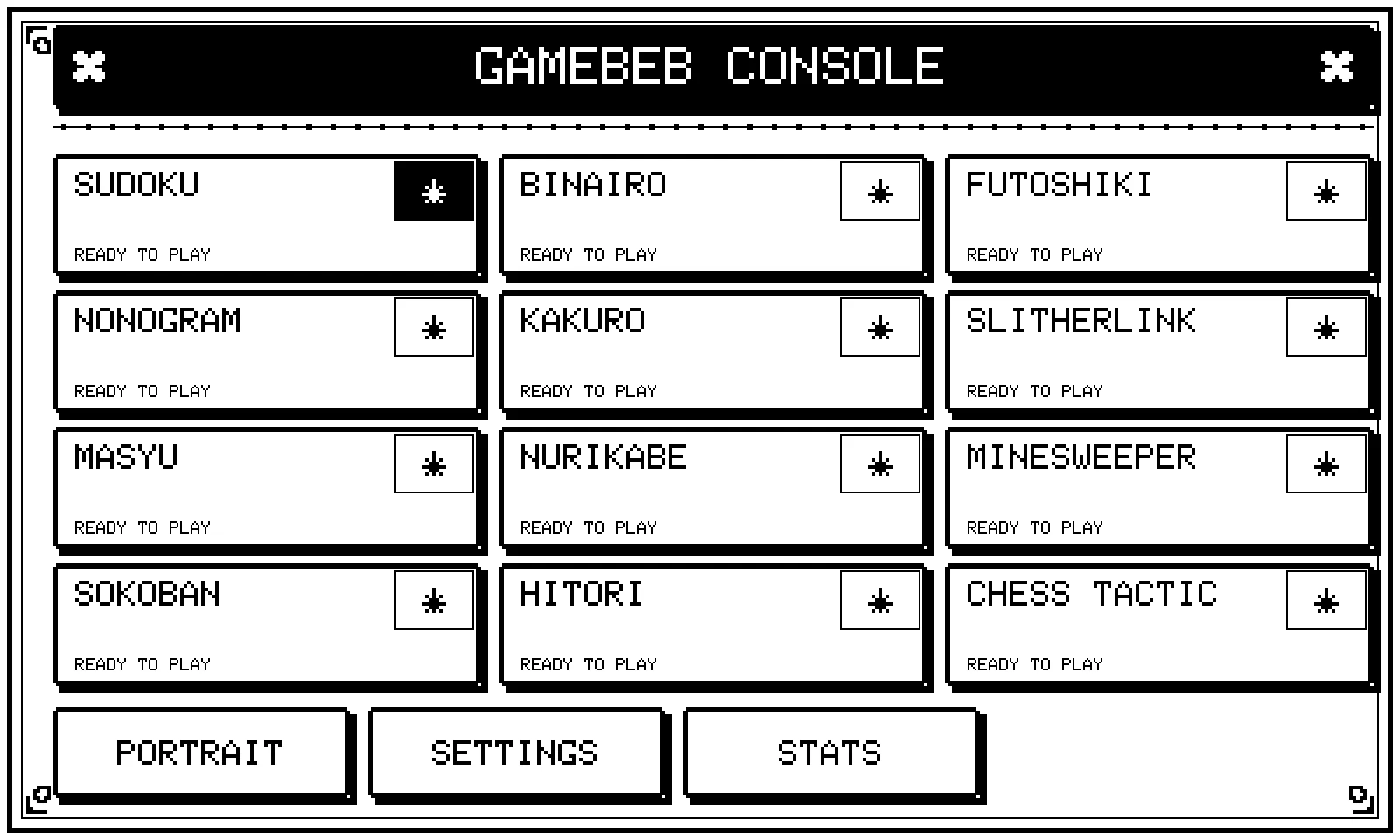
Gamebeb is a handheld puzzle console built around a 7.5 inch touch e-ink screen. It plays 18 logic games, from Sudoku and Killer Sudoku to Kakuro, Slitherlink, Nonogram, Masyu, Bridges and a no-guess Minesweeper. Almost every puzzle is invented by the console itself, on the spot, and checked to have exactly one solution.
The idea is a dedicated puzzle machine that feels like paper. The screen reads like a printed page, there is no network needed to play, and there is nothing else on it: no feed, no notifications, just the next puzzle.
Specifications
- Games
- 18
- Generated on the device
- 16 of 18
- Difficulty tiers (Sudoku)
- 8
- Response per move
- 1.6 s to 0.4 s
- Idea to 18 games
- about a week
- Case
- 3D printed, 182 mm wide
What it enables
Endless puzzles with no app and no connection. A puzzle book runs out, and a puzzle app comes with a phone attached. Here, finishing a puzzle just means tapping “New”, and the console makes a fresh one. For Sudoku it even keeps a stock for every difficulty, so the next one is already waiting, on a plane, at the beach, or anywhere without signal.
A screen you can stare at for an hour. E-ink has no backlight and no glare. It reads like newsprint in daylight, with nothing glowing in your face, which matters for games you play slowly.
Difficulty you can trust. “Hard” here means the puzzle really needs harder reasoning, not just fewer numbers on the grid. Every puzzle is graded by solving it first, so picking a tier gives you the kind of challenge you asked for.
One device, many kinds of thinking. Number logic, shading puzzles, loops, sums, pushing crates, chess tactics. Every game shares the same controls, the same hint and undo, and the same stats, so trying a new one costs nothing.
Highlights
- 18 games in about a week. From the first time the screen lit up to a console with 18 playable games, a shared interface and stats took roughly seven days.
- 16 of the 18 games invent their own puzzles. Each new board is generated on the device and checked to have exactly one solution. Only Sokoban and the chess tactics use a curated set.
- Every move got 4 times faster. The screen first took about 1.6 seconds to respond to a tap. It now updates a cell in about 0.4 seconds, fast enough that playing feels direct.
- Eight Sudoku tiers, graded by solving. Easy to Nightmare, and each tier is filled from puzzles the console solved and rated itself. From empty, it stocks all six common tiers in about two minutes, then keeps them topped up in the background.
- Minesweeper that never makes you guess. On a slow screen, losing to a coin flip would be unbearable, so every board it deals can be cleared by logic alone.
How it works
At its heart is a small, cheap microcontroller driving the e-ink panel and its touch layer, with a vibration motor for feedback and a rechargeable battery behind it all. On top of that sits one shared framework for grids, touch, hints, undo and stats, and each game is a small engine that knows its own rules, how to make a puzzle and how to check that the puzzle has a single answer.
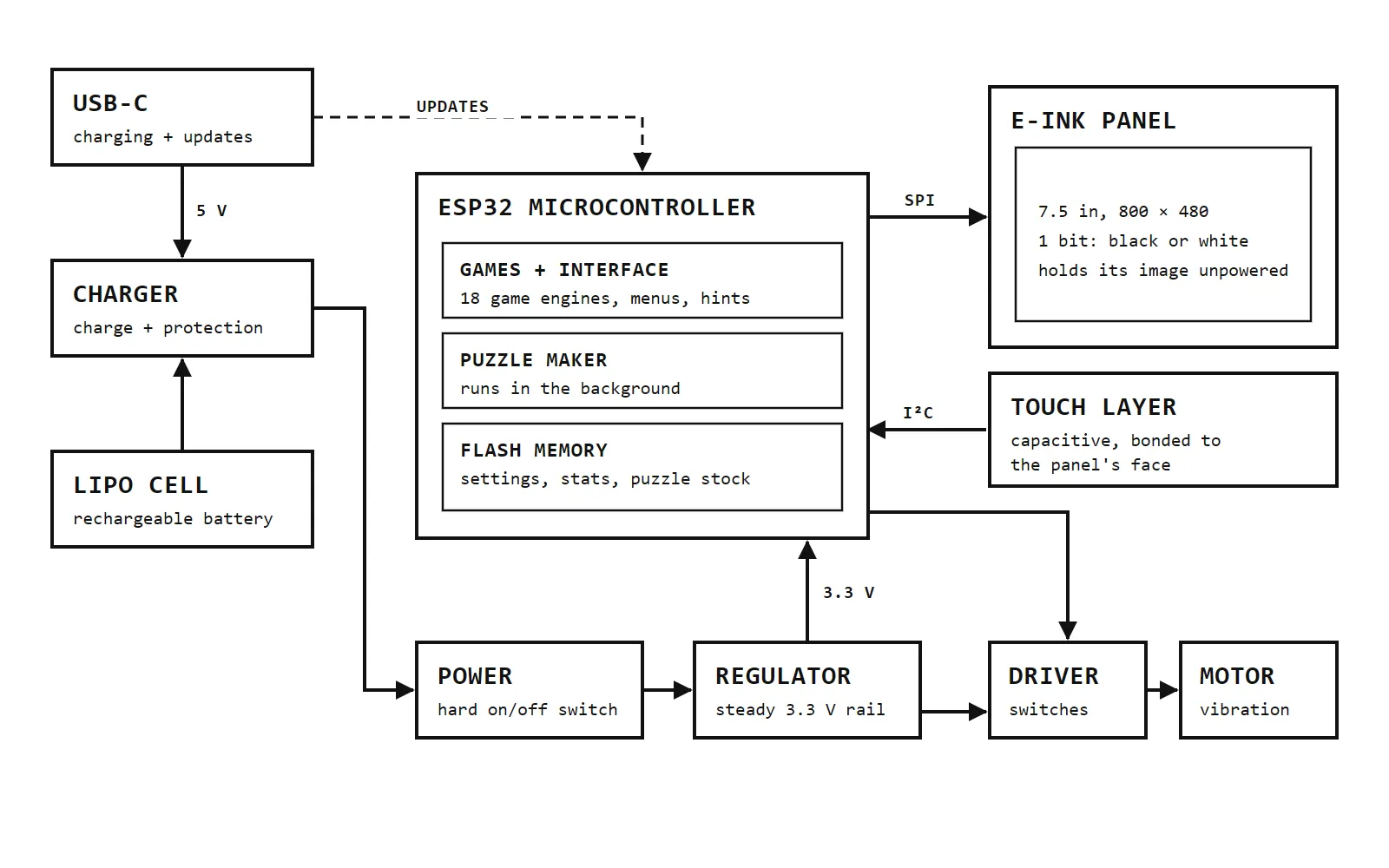
- 1 Paper-like screen Picked for slow games: no glow, and the picture stays with the power off.
- 2 Touch on the glass Bonded to the panel, so a fingertip is all you need.
- 3 Puzzle maker Works in the background between your taps, so the next puzzle is waiting.
- 4 Memory Settings, stats and spare puzzles survive switching off.
- 5 Vibration The fastest part of the console. It answers before the screen can.
- 6 Battery Rechargeable over USB-C, with a hard off switch.
While you play, the console quietly prepares and grades the next Sudoku puzzles. The screen side is all about care: e-ink is slow and easy to damage if driven carelessly, so the console only redraws what changed, puts the panel to rest after every update, and tidies the whole screen up when you are not looking.
Designing it, one question at a time
Most of this project was a list of questions I kept asking myself, and nearly every answer came back to two facts about e-ink: it is slow to change, and it has no grey. Here are the questions in the order I ran into them, each with the drawing that settled it.
How big should the screen be?
The first plan was a 4.2 inch panel, and on paper it worked: a full Sudoku grid, a keypad and a tool row, all in 400 by 300 pixels. Then I worked out what that meant in millimetres. The cells came out under 7 mm wide, which is fine with a stylus and fiddly with a finger, and I did not want a stylus anywhere near this. A tap that lands on the wrong cell, on a screen that takes a moment to answer, is the quickest way to make the whole thing feel broken.
So I moved up to a 7.5 inch panel. Drawn side by side at the same scale, the reason is plain: the same fingertip that spans several small cells sits on about one big one, and there is room left for a proper keypad beside the grid instead of a squeezed row underneath.
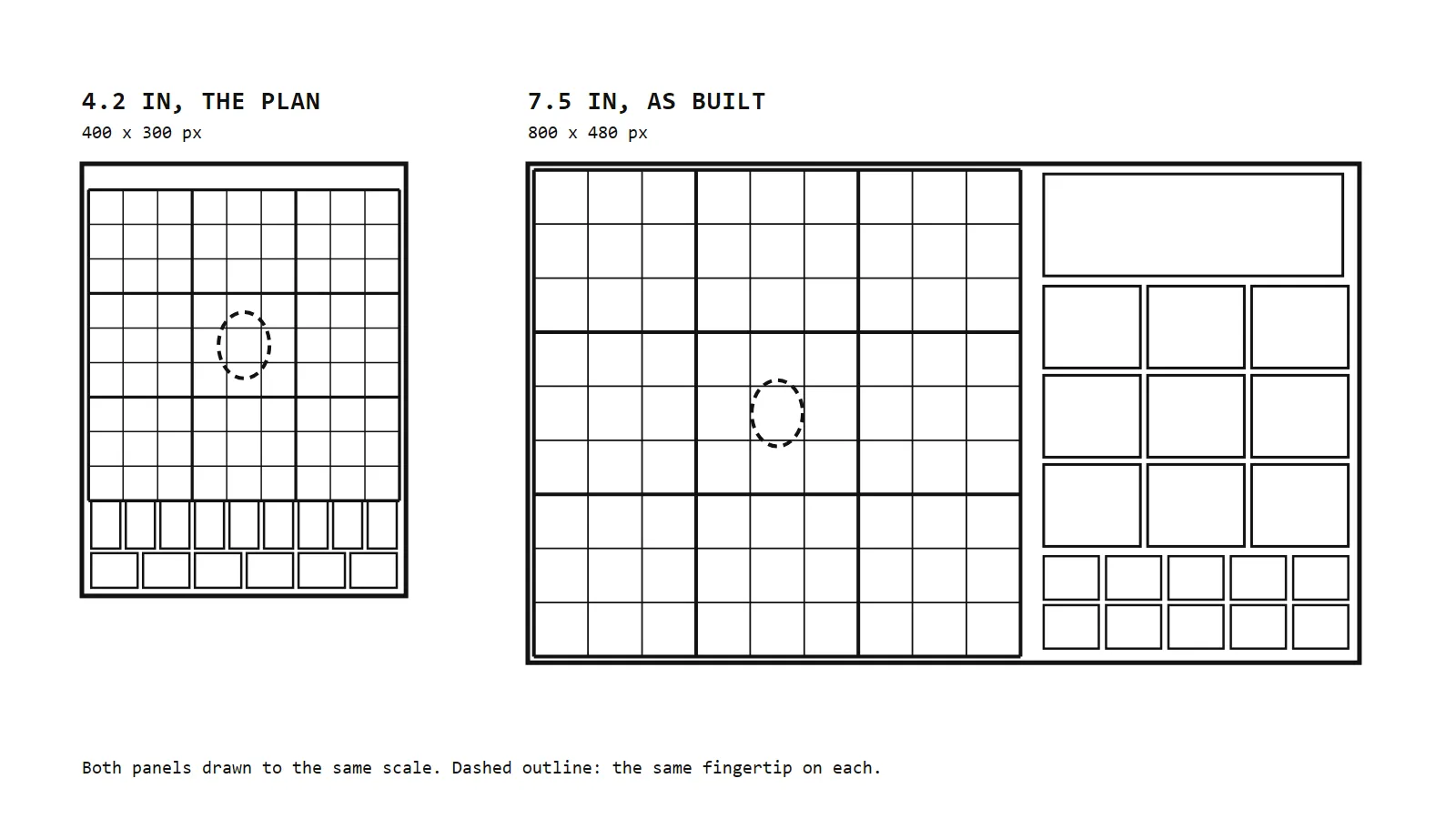
- 1 The first plan A 4.2 inch panel. Everything fits, but only just.
- 2 One fingertip Covers several small cells at once. Easy to hit the wrong one.
- 3 Squeezed keypad The keys shrink to a single row under the grid.
- 4 What I built 7.5 inches: cells about 10.6 mm, one finger, one cell.
- 5 Real keys A 3 by 3 keypad with keys about 20 mm wide.
How do you draw with only black and white?
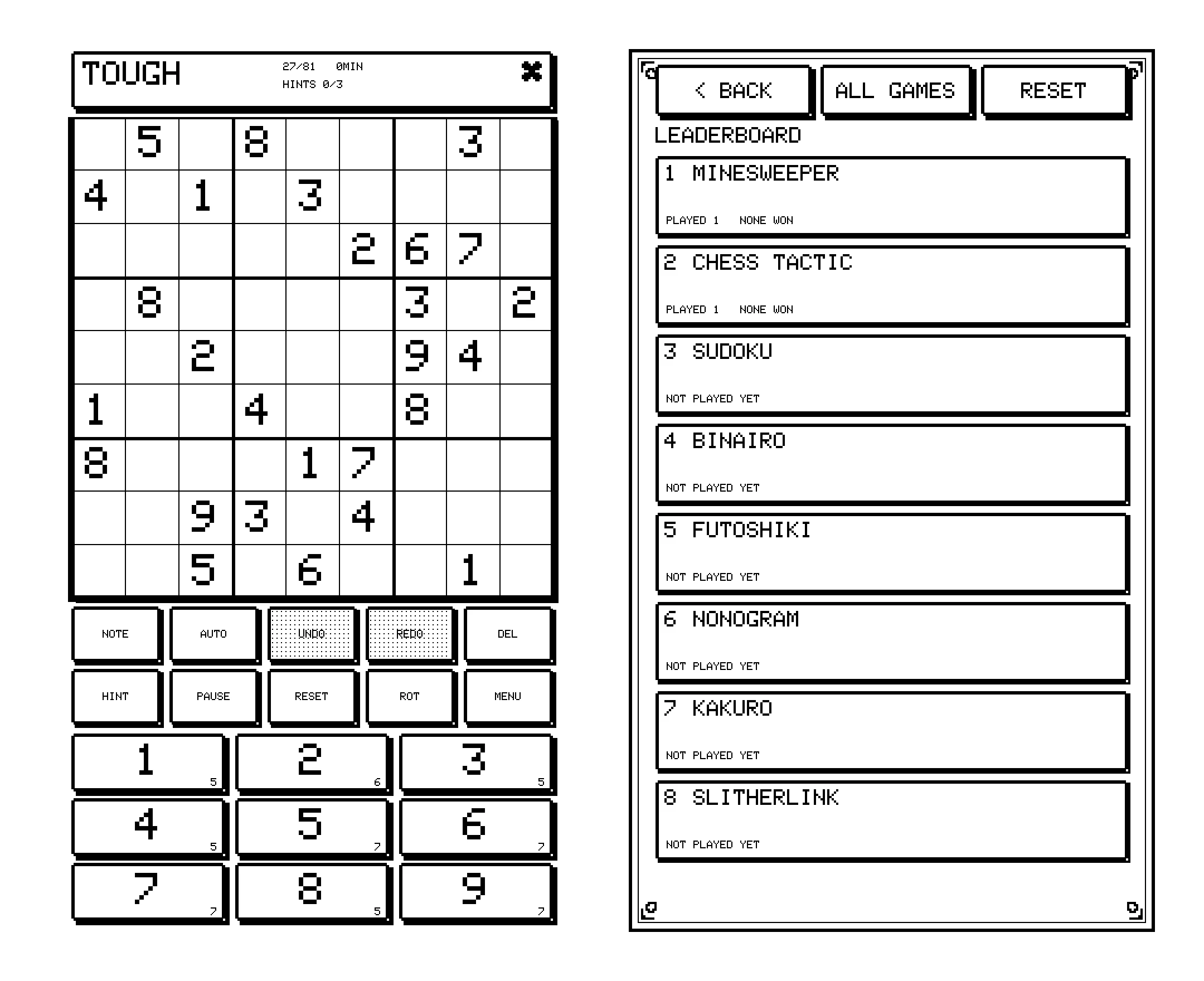
The panel has exactly two colours. No grey, no smoothing, and no colour to tell your numbers from the clues or a mistake from a correct move. Everything a phone would show with colour had to be built from black pixels, so I leaned into it: pixel type drawn at whole-number sizes so every stroke stays crisp, chunky frames with hard shadows, and patterns of dots standing in for grey. It is the look of old handheld consoles, because those were designed for the same limits. Smooth fonts and gradients only turn ragged on a screen like this.
The close-up below is read straight back from the device, pixel for pixel. Each mark answers a question that colour would normally answer. For anyone who finds the pixel style busy, there is also a plain, clean theme over the same layout.
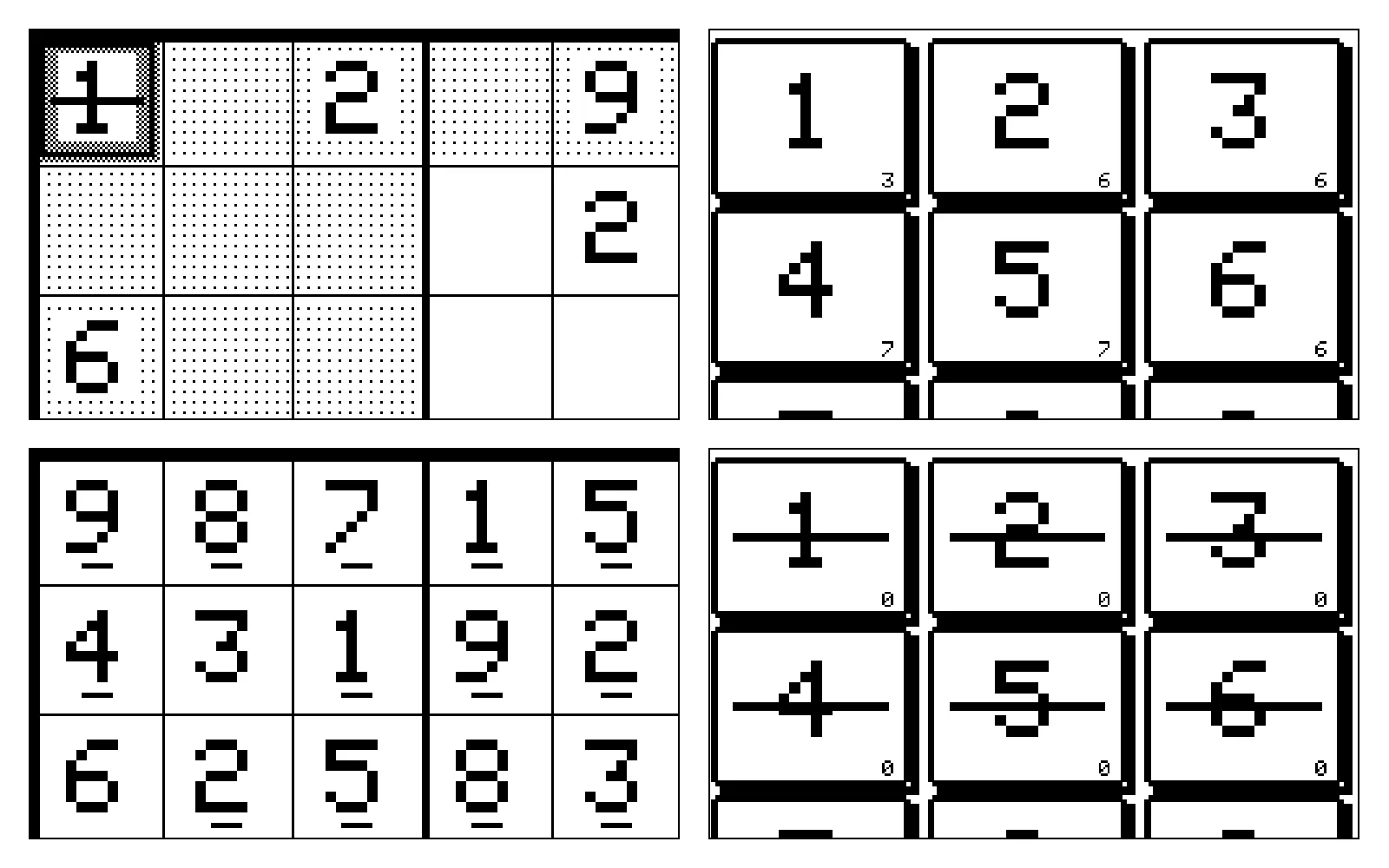
- 1 Selected, and wrong A checkerboard marks the selection. A bar through the digit marks a mistake.
- 2 Dots for grey Light dots shade the row, column and box of the selected cell.
- 3 A white margin Every digit keeps clear space around it, so the dots never touch it.
- 4 Count on each key How many of that digit are still to place.
- 5 Yours or a clue Digits you place get a small foot. The clues stay plain.
- 6 Finished digits Struck through once all nine are placed, and the key stops taking input.
How does a slow screen feel quick?
E-ink takes time to change, and at the start it took about 1.6 seconds to show each move. You tap, nothing happens, you wonder if it registered, and you tap again. There was no single fix. What worked was answering the player before the screen does, in three ways.
First, every accepted tap gets a short buzz at once, before a single pixel moves, so your hand knows the tap landed while the screen is still working. How strong a buzz feels depends on the motor, how it sits in the case and whose hand is holding it, so the strength is a setting rather than a fixed number. Second, the console redraws only what changed, and after a lot of measuring on the real hardware a move now lands in about 0.4 seconds. Third, the slow job, wiping away the faint ghosts e-ink leaves behind, waits until you stop to think, so it never gets in the way of a move.
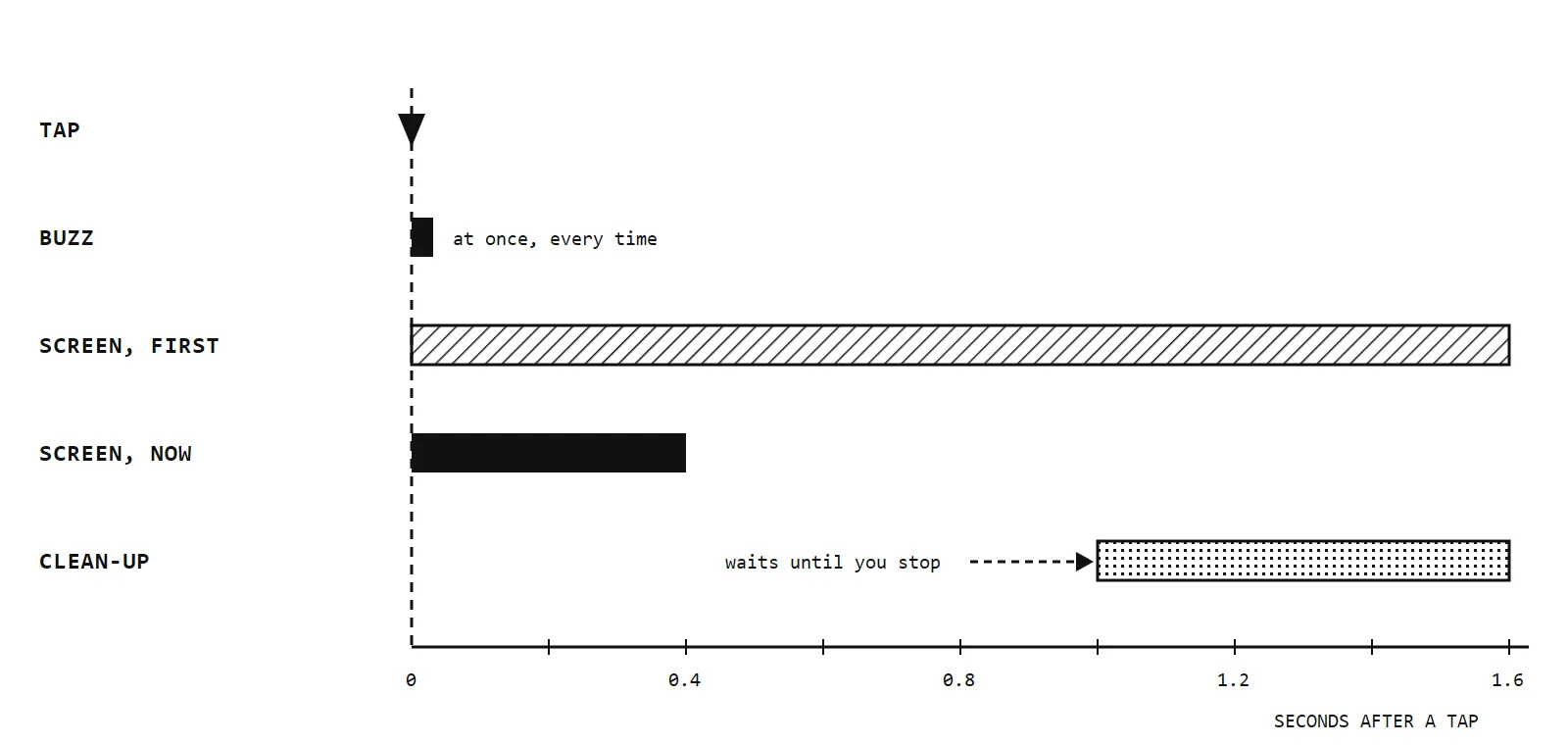
- 1 Buzz first The motor answers at once, so a tap never feels missed.
- 2 Where it started About 1.6 seconds a move. Too slow to feel like playing.
- 3 Now About 0.4 seconds, four times faster.
- 4 Clean-up later Ghosts are cleared when you pause, never in the middle of a move.
Portrait or landscape?
I went back and forth on this, and my notes from the time say it plainly: decide by holding the finished thing, not on paper. Portrait gives a full-width keypad under the grid. Landscape keeps the grid, the status and the keys side by side, in one glance. In the end I did not choose. The console lays out the whole interface for either way, and you can switch in the middle of a game without losing your board.
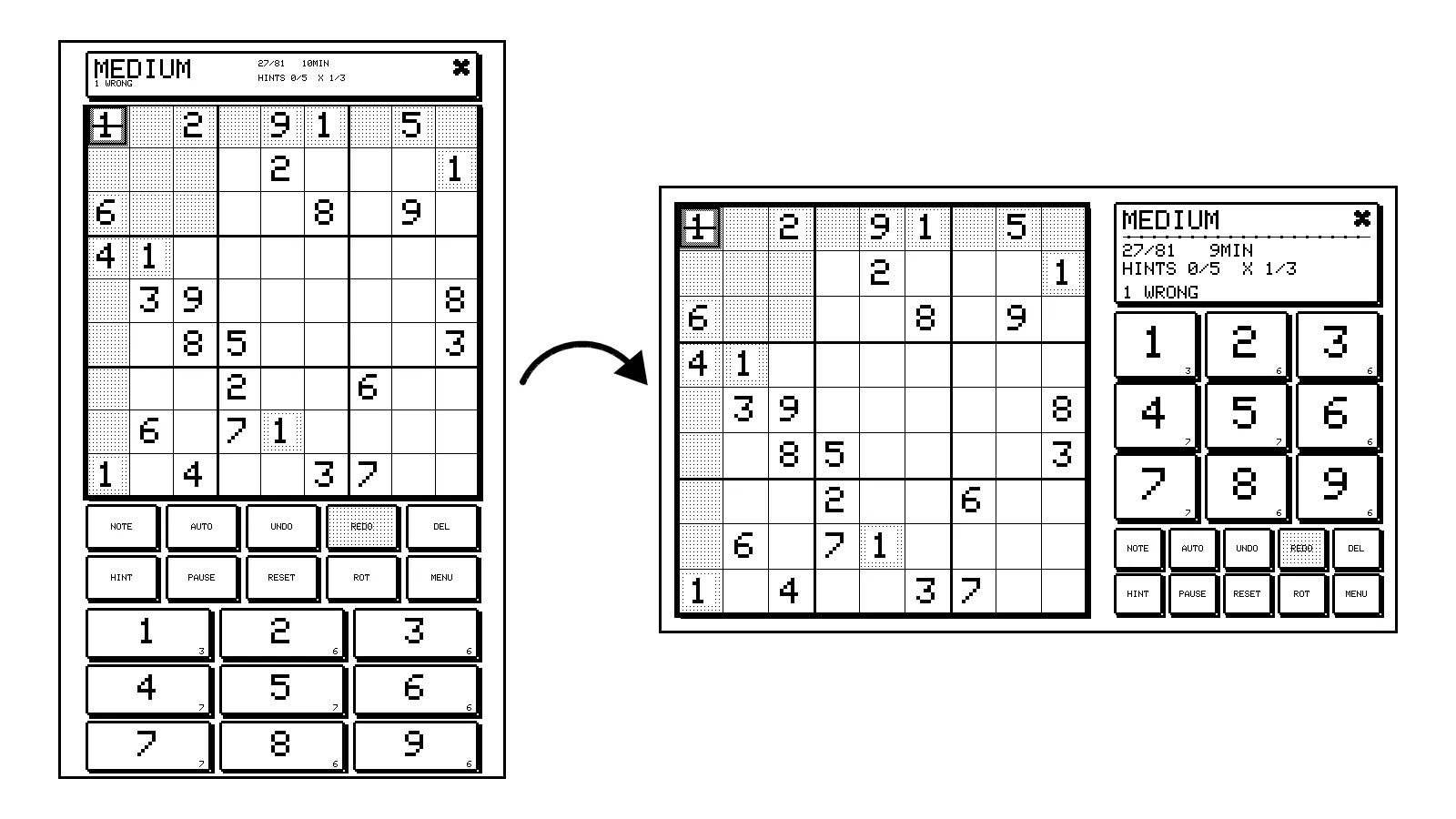
- 1 Portrait Grid on top, a full-width keypad underneath.
- 2 Laid out again Not just rotated. Every screen has its own layout for each way up.
- 3 Landscape Grid on the left, status and keys on the right.
- 4 One tap to turn Switch mid-game. The board comes with you.
Which games belong on it?
Every game had to be turn-based and played on a grid, so that each move changes only a few cells. That rules out anything animated, and also favourites like 2048 and solitaire, which redraw half the screen on every move and would feel broken here however well they were built. What fits is the logic-puzzle family. Binairo is literally a black-and-white game, a Nonogram turns into a picture as you solve it, and the loop and region puzzles look like ink on paper. Minesweeper only made the cut once it could promise no guessing. Chess is a tactics trainer rather than an opponent: it knows the rules and the answer to each position, nothing more.
All of them sit in the same frame, with the same buttons in the same place, so a new game costs nothing to learn.
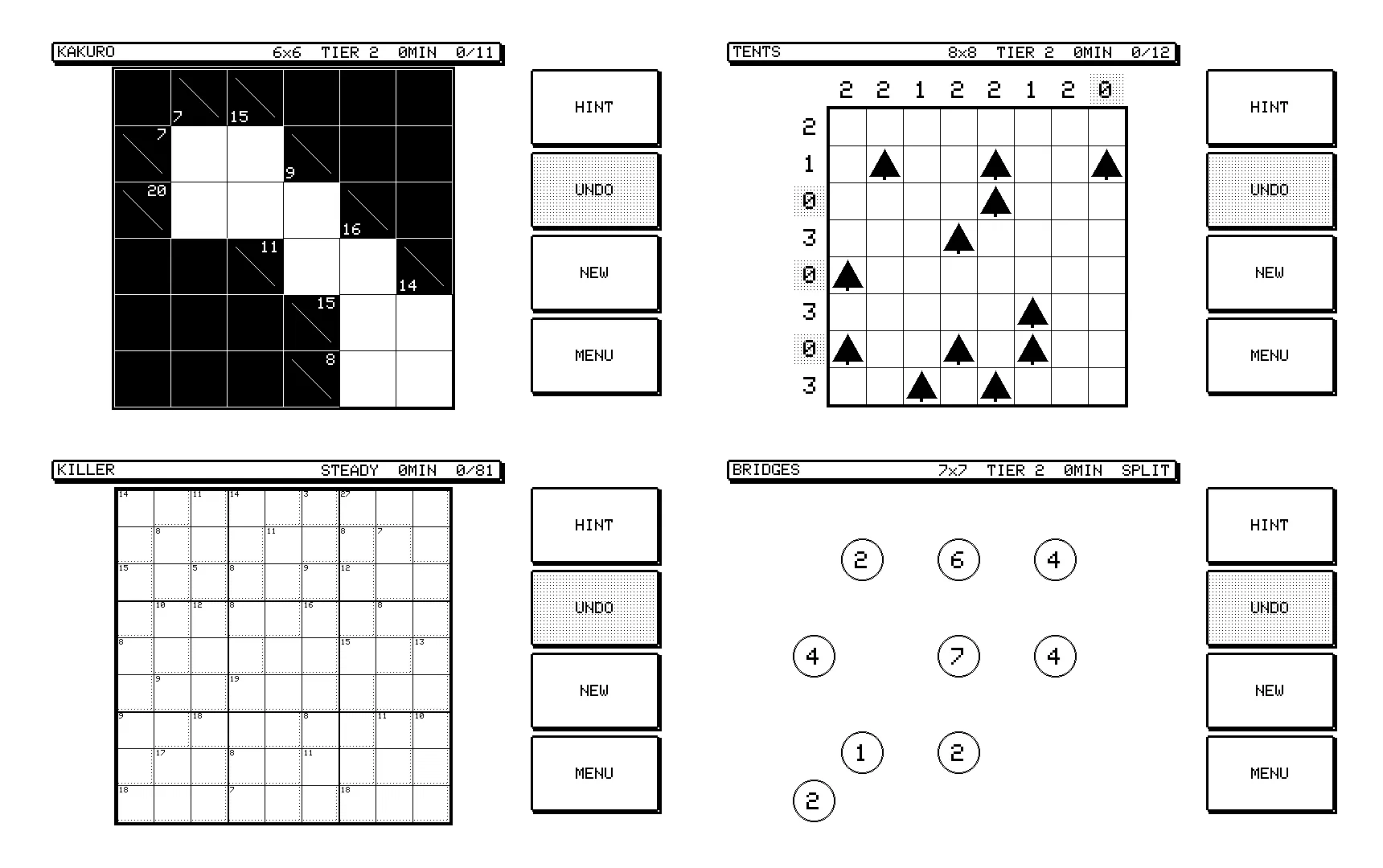
- 1 Kakuro A crossword made of sums. Lines and digits are what e-ink does best.
- 2 Same controls Hint, undo, new and menu sit in the same place in every game.
- 3 Tents One tent per tree, with edge counts as clues.
- 4 Killer Sudoku No starting digits at all. The cage totals are the only clues.
- 5 Bridges Join every island, generated with exactly one answer.
What makes a puzzle hard?
Most Sudoku apps judge difficulty by how many numbers they give you at the start. That is a weak guide: two puzzles with the same number of clues can feel completely different. I wanted “Hard” to mean the puzzle needs harder thinking, so the console grades every puzzle by solving it first, the way a person would, and looking at what the solve took.
That decision shaped the difficulty screen. There are eight tiers, each stocked ahead of time so you never wait for a puzzle to be made. Nightmare, at the top, is honest about what it is: the puzzle is fair and has one answer, but logic alone will not get you there, and the screen says so before you start.
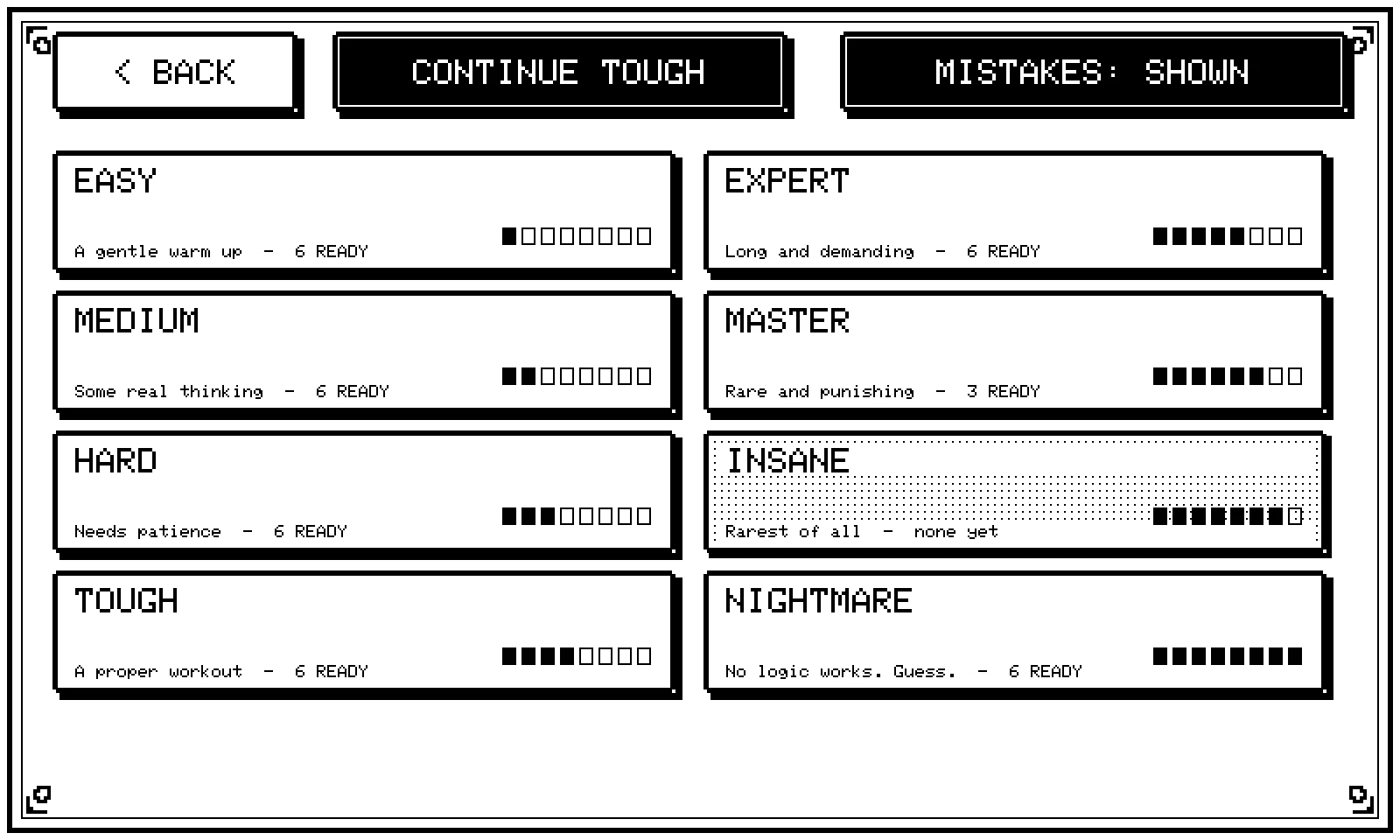
- 1 Eight tiers Graded by solving, from a gentle warm-up to puzzles logic cannot crack.
- 2 Stock on hand Made ahead, so you never wait, and kept through a restart.
- 3 Insane So rare the console has not produced one yet.
- 4 Nightmare Fair and unique, but you will have to guess. It says so up front.
- 5 Mistake checking See errors as you go, or play without a safety net.
What should the case look like?
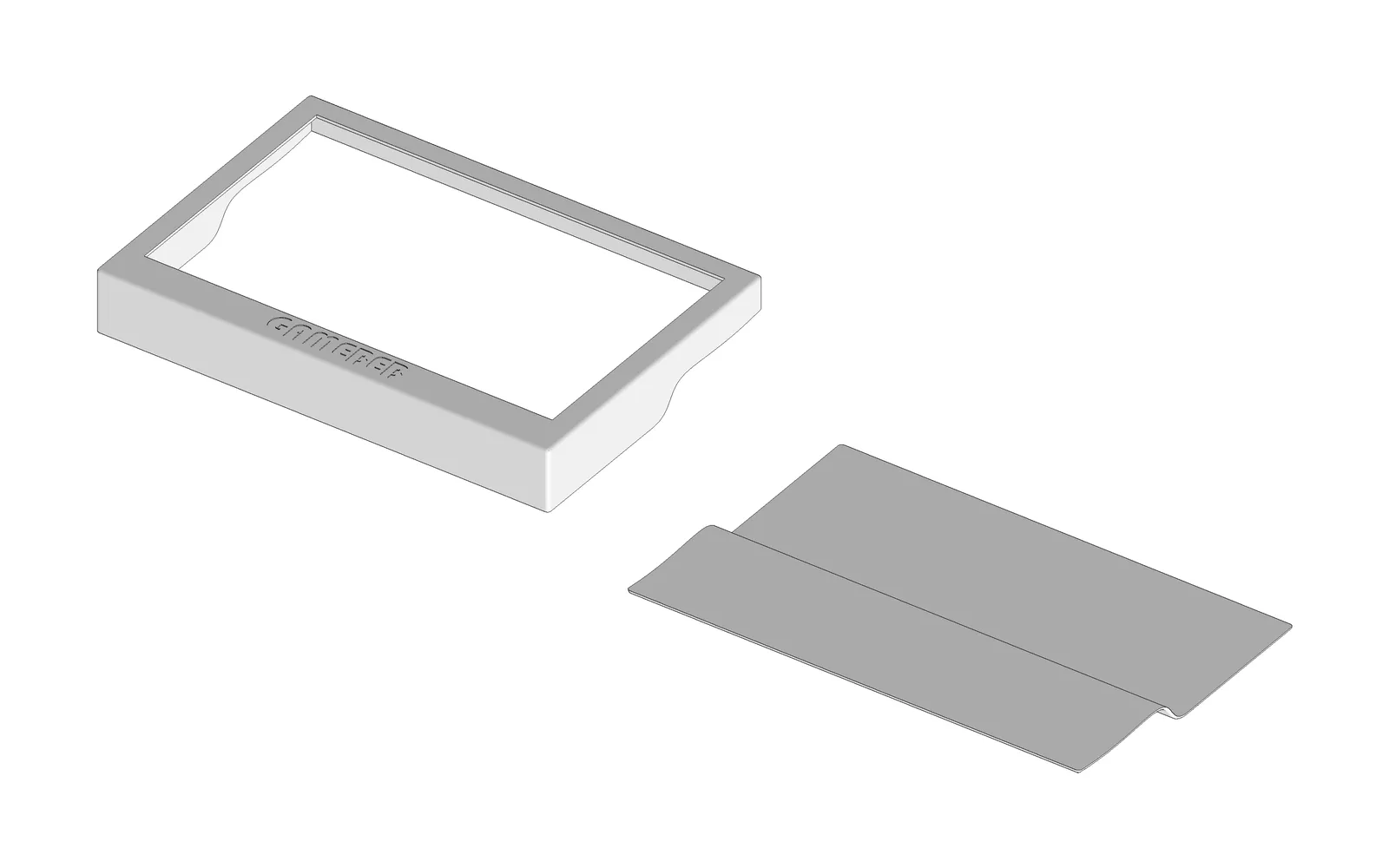
The case is two printed parts, a frame around the screen and a back that closes it, and almost every line on it comes from what sits inside.
The window is cut to the part of the screen that actually shows a picture, 164 by 99 mm, so the frame hides the panel’s blank borders. It is not centred, because the picture is not centred on the panel either: the edge where the panel’s ribbon cable leaves has a wider border. That wider strip of frame, under the screen, became the place for the name.
From the side, the case has two depths. Along the bottom edge, under the name, it is about 27 mm deep. The rest of it only has to cover the back of the screen, so it drops to about 16 mm. A single back plate makes that step in one S-shaped bend, and the side walls are cut to follow the same curve, which is where the curved notches on the sides come from. Inside, the screen rests on a thin lip behind the window, with a low rib around it so it cannot slide. Nothing presses on its face, because pressure on e-ink leaves marks that never go away.
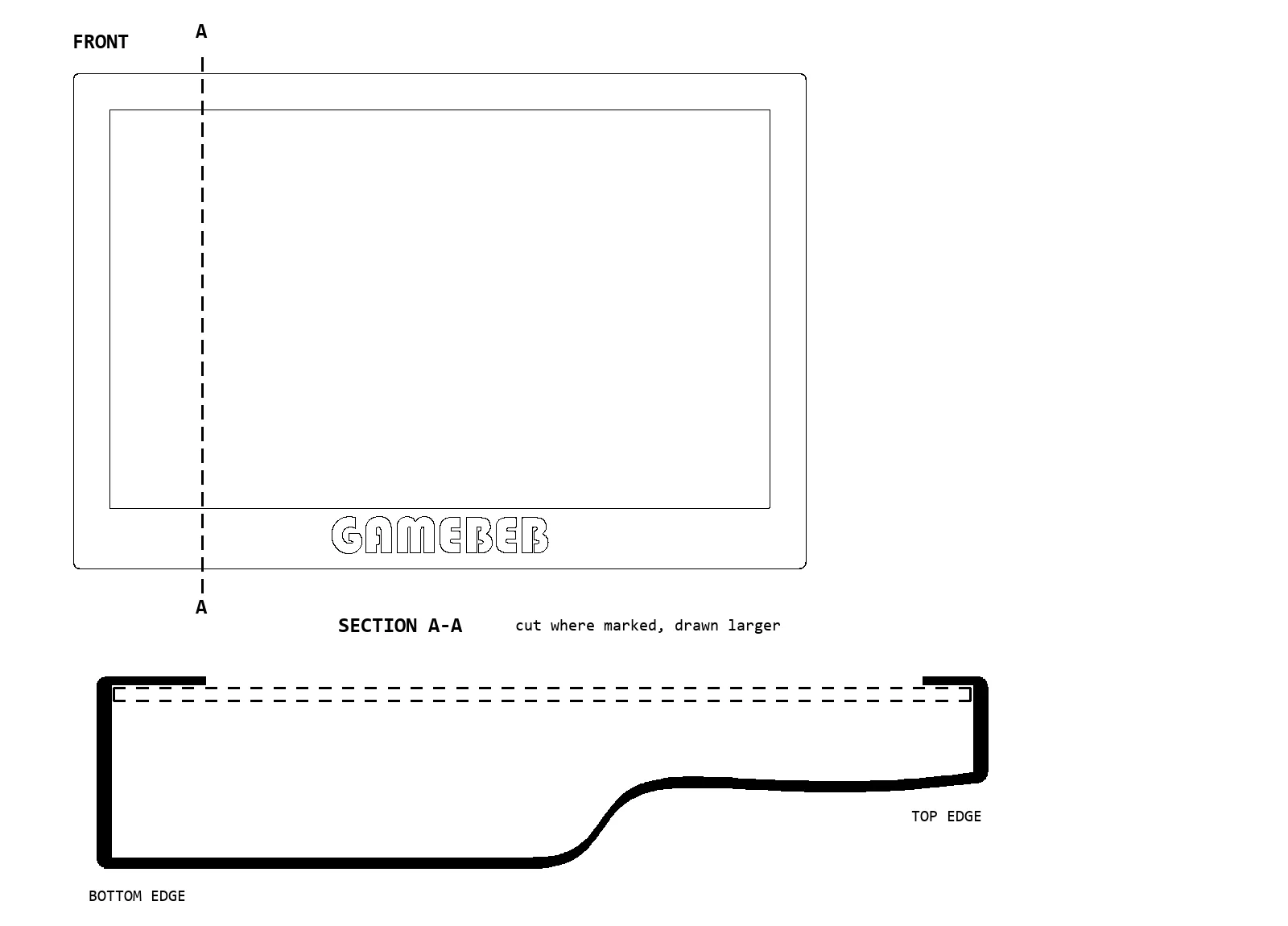
- 1 Window 164 by 99 mm, cut to the picture so the panel borders stay hidden.
- 2 Wider bottom strip Off-centre on purpose: the panel border is wider here. The name fills it.
- 3 Screen on a lip Held at its edges with a rib around it, never pressed on its face.
- 4 Deep side About 27 mm under the name.
- 5 Slim side About 16 mm, just the screen and a thin back.
- 6 One S-shaped bend The back steps between the two depths; the side walls follow it.
What else made the cut
A few more features earned their place on a screen that takes a moment to redraw:
- Hints that teach before they tell. The first tap points at where to look, the next names the idea you need, then the cells are highlighted, and only the last tap places the digit. Hints are worked out from your board as it is right now, so they stay correct after you go your own way, and if you have made a mistake the console says so instead of leading you further off.
- Mistakes and lives, your choice. Show errors as you go, cap how many you are allowed, or switch both off and play as you would on paper. Some players want a safety net, others feel it spoils the puzzle.
- Undo, redo and pause. Pausing blanks the grid, which keeps the timer honest.
- A sleep screen worth leaving out. E-ink keeps its picture with the power off, so the sleep screen is what the console looks like most of the time. I designed it as something you would not mind leaving on a desk. Any tap wakes it.
- Stats and a leaderboard. Plays and wins for every game, ranked, all kept on the device.
Challenges
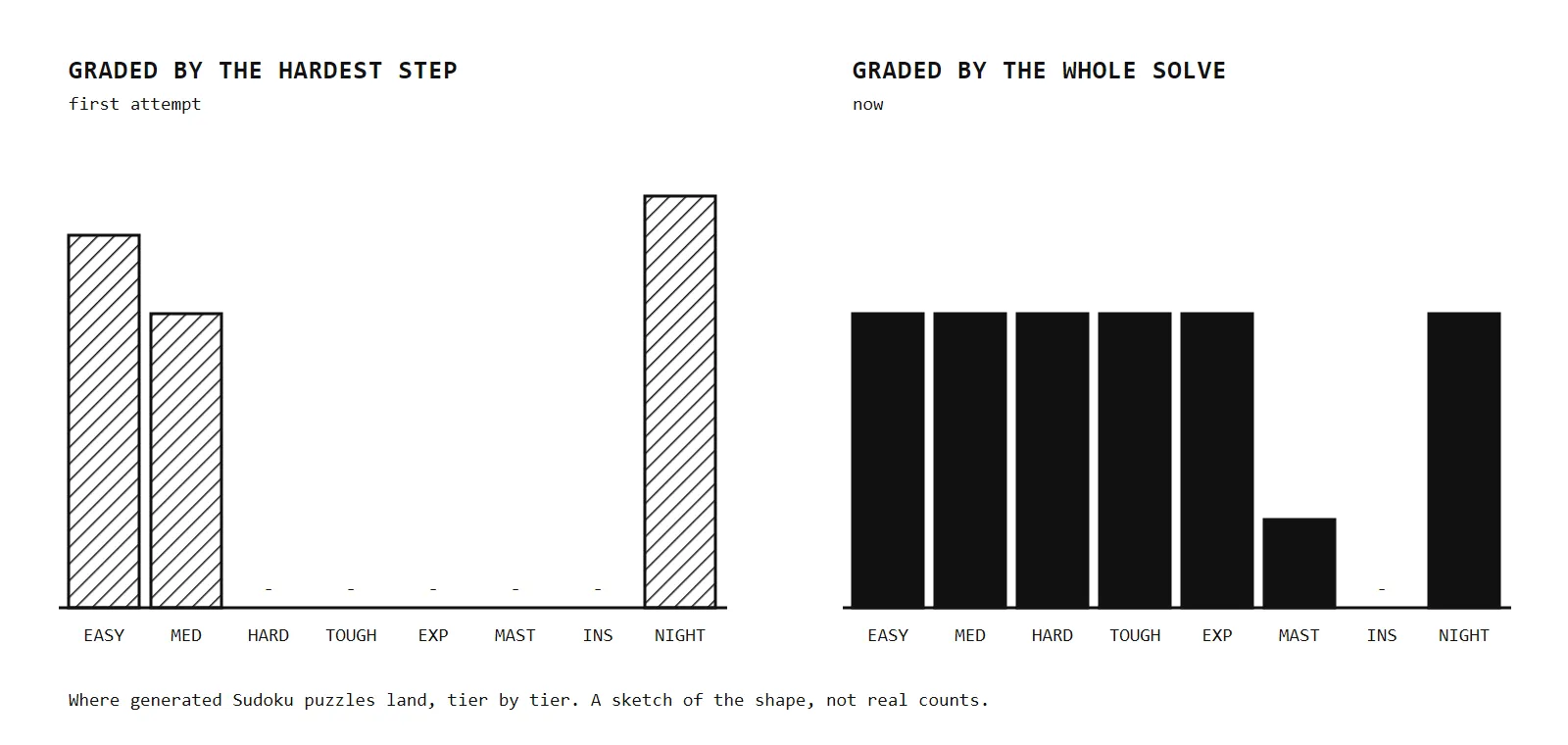
- 1 First attempt Easy, or straight to guessing. Nothing in between.
- 2 Now Graded by the whole solve, the middle tiers fill up.
- 3 Master Thin: it appears only when a puzzle happens to land there.
- 4 Insane Not produced yet.
Outcome
The console is finished: it runs on its own battery, inside its printed case, with all 18 games, eight Sudoku tiers, hints, undo, statistics, haptic feedback and both orientations. Two Sudoku tiers are still thin: Master only appears when the generator happens to land on one, and Insane has not shown up yet.